
Packaging · 8 min read
How to price add-ons: what goes in the plan and what costs extra

Key points
- A software product's base tier holds what almost every customer needs; a higher tier holds what many value. Add-ons are for high value to a few customers.
- If a software feature is used by closer to 20% than 90% of customers, that feature is a candidate for an add-on.
- Software features with high costs per use, such as AI, belong in an add-on or an allowance with a cap or usage-based price, so the margin holds.
- Price a software add-on on the value to the group that buys it. If it costs more than the step up to the next tier, customers buy the tier instead.
If you sell software in plans, the plan should hold what almost every customer needs, and a higher tier should hold what many customers value and will upgrade for. An add-on pays off for features with high value to a small group and for features whose use costs you money on an ongoing basis, such as AI. Price the add-on on its value to exactly that group: flat, per user or by usage.
Two questions decide where a feature goes
We sort AI features by two questions: How many customers use them, and how much extra value do they create? The grid fits any feature. My colleague Mariella Knospe explained it this way. If the market has a baseline expectation, the rule is: “That has to go in my base plan.” Features with extra value for a smaller share of customers drive the upgrade to the middle tier. If the value is very high and the user group very small, it becomes an add-on.
| Feature | Place | Goal | Typical price form |
|---|---|---|---|
| almost everyone uses it, little extra value | base tier | appeal and retention | included in the plan price |
| many use it, high extra value | higher tier | upgrade incentive | included in the plan price |
| high value for a small group | add-on | capture willingness to pay | flat or per user |
| high running costs per use | add-on or allowance | protect margin | by usage or credits |
| value and demand still unclear | beta or pilot | learn | limited, often at no extra charge |
| solves a separate problem | separate product | new revenue stream | its own pricing model |
Based on the SaaS & AI Pricing Report 2027, pp. 23, 26 and 38.
I raised a rough threshold in my conversation with Nikolai Skatchkov of Circula, and he confirmed it: features used by closer to 20% than 90% of customers are more likely an add-on. At Circula, examples are “an SAP integration or our CO2 tracking, which we offer as an option.” Not every customer needs either, and those who do have a clear reason.
Add-on or higher tier
The hardest call is between an add-on and a higher tier. A higher tier bundles several features for one customer group and gives that group a reason to move up as a whole. An add-on extends a plan by exactly one thing.
My rule for new features: When a big new solution is added, it doesn't automatically belong in the existing core plan. It's a chance to build a premium tier or a second plan from it. The third big building block creates the third tier, and then you stop there. If you push every new feature into the base tier, you give it away. If you sell every one as an add-on, you end up with a price list nobody understands.
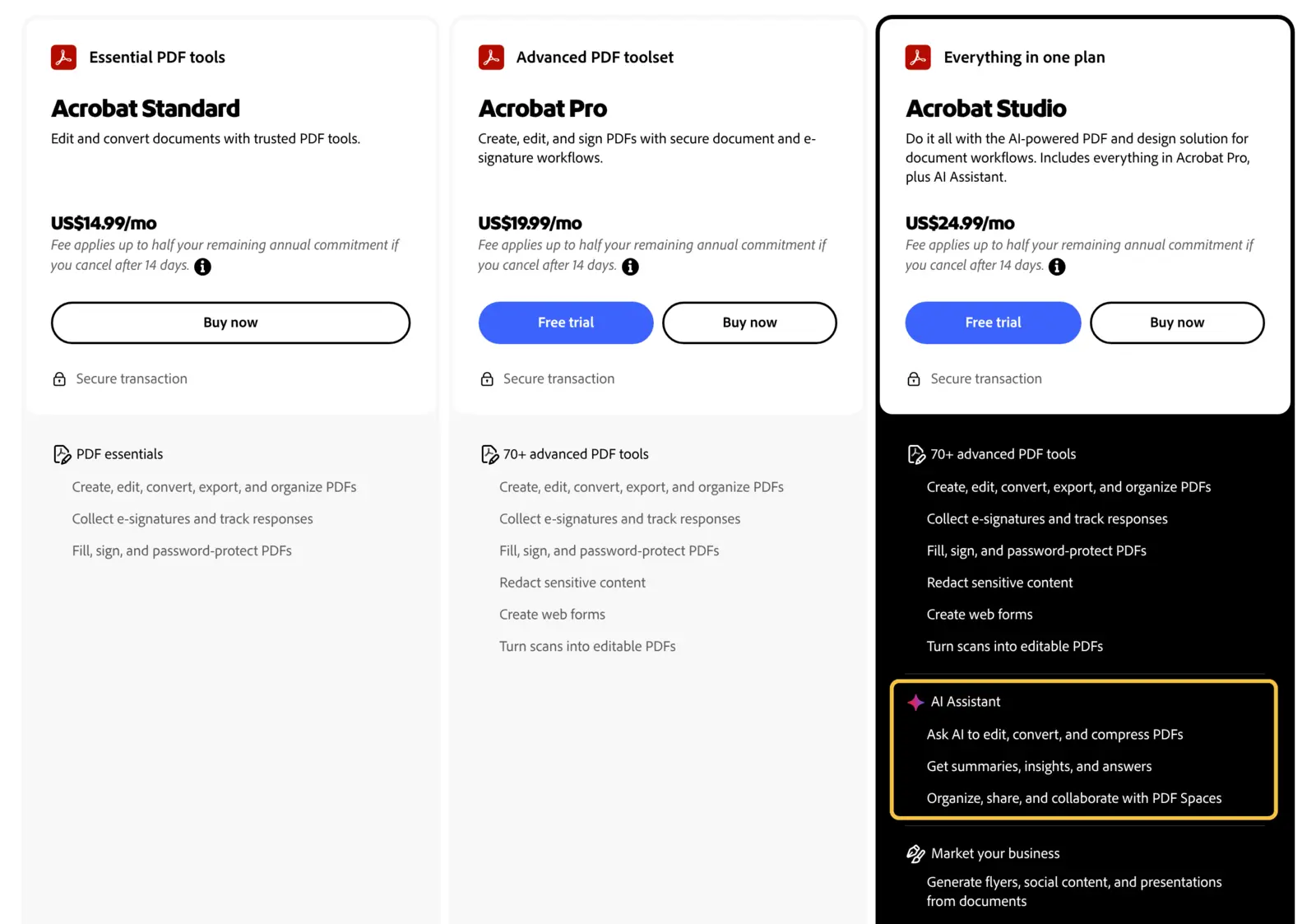
One pattern combines both routes. According to our SaaS & AI Pricing Report 2027, Adobe, as of 2026, offered its AI assistant as a bookable add-on in the smaller Acrobat plans, while the more expensive plan already included it. Customers who needed it could buy it or upgrade, and the add-on made the larger plan more attractive.
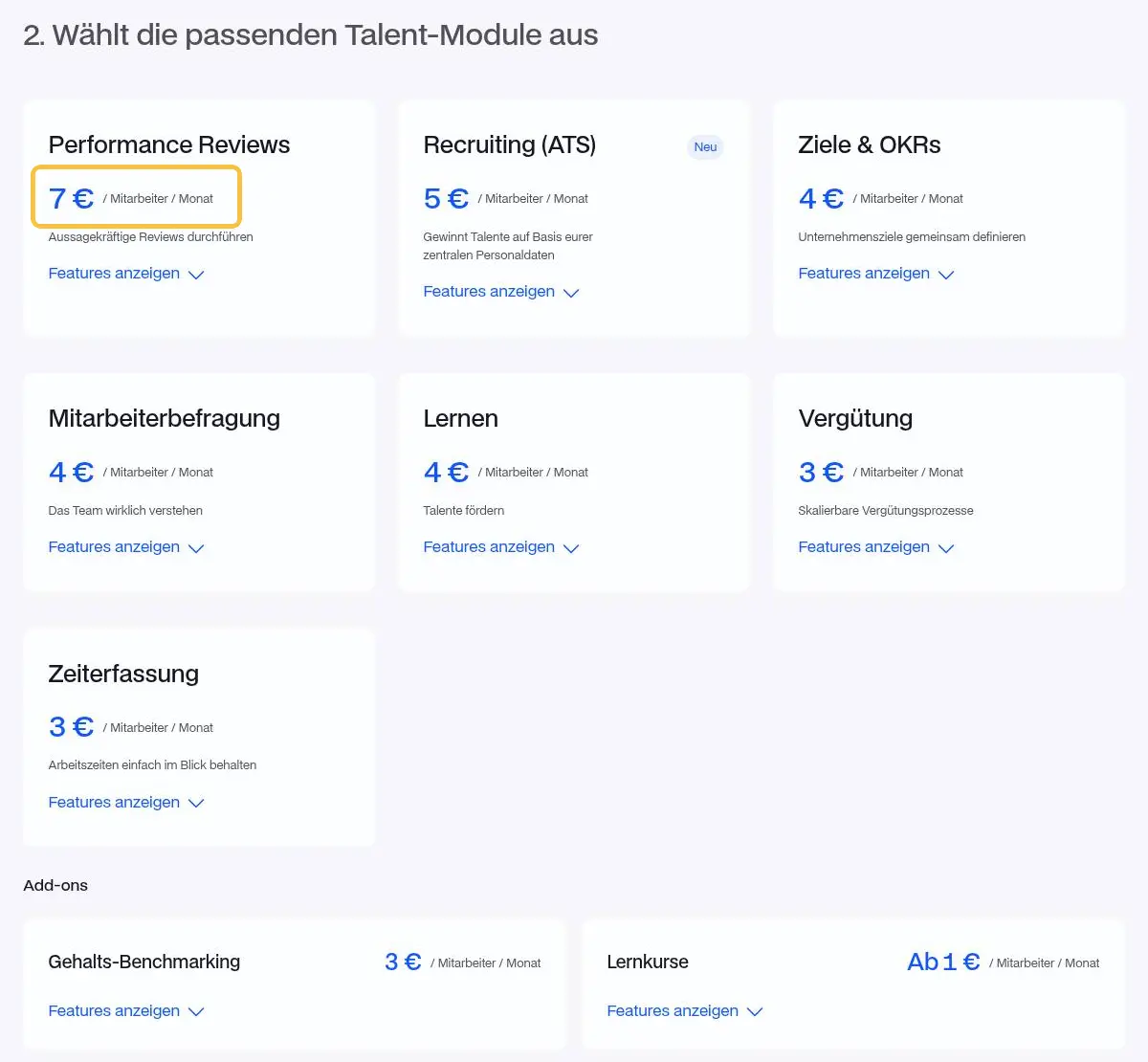
For some vendors, plans don't fit. Jenny Podewils of Leapsome explained why her company doesn't use good-better-best: It has more of a “menu of different modules” that customers combine freely. Each module has its own price per user. That's the edge case where the whole offering consists of add-ons. We distinguish six of these bundling forms, from the all-in plan through core product plus add-ons to the modular kit.
Worked example: add-on, price increase or tier
Worked example: A vendor has 50 customers on the base tier at €400 a month. Ten of them, or 20%, want a new feature.
| Route | Calculation | Added revenue per month | What the other 40 customers experience |
|---|---|---|---|
| add-on at €150 | 10 × €150 | €1,500 | nothing |
| price increase of €30 for everyone | 50 × €30 | €1,500 | they pay for something they don't use |
| higher tier at €550 | 10 upgrades × €150 | €1,500 | nothing, as long as they don't need the other content |
On paper, all three routes bring the same revenue. The price increase for everyone is the riskiest, because 40 customers see a surcharge with nothing in return. Mark Miller of Carlsquare describes the same idea for AI: If the use case is clearly defined, a separate offer can bring new revenue without confusing existing customers with a blanket price increase. The higher tier pays off when it bundles more content for the same customer group alongside the new feature. If it contains only that one feature, it's an add-on in disguise.
How to price the add-on
- Base it on the value to the small group. Whoever buys the add-on has a specific reason. Ask what the feature saves or earns these customers. Development costs aren't a good basis.
- Reuse the plan's metric where it fits. If the base tier is paid per user, a per-user surcharge is the easiest for buyers to understand.
- Bill by usage when there are running costs. AI features have two routes. A fixed surcharge per license, such as €20 per user a month, is familiar and easy to plan, but carries a margin risk with heavy users. That's how Microsoft launched Copilot for Microsoft 365 in 2023: for enterprise customers at $30 per user per month. Usage-based billing protects the margin but can keep customers from trying the feature. Allowances or credits combine both.
- Don't make the add-on more expensive than the step to the next tier. If an add-on costs more than the surcharge for the higher tier, the customer buys the tier instead, and the add-on doesn't sell.
- Keep the list short. I'm a big fan of simplicity and transparency. Every add-on is one more decision for the buyer.
Where the market stands on AI add-ons
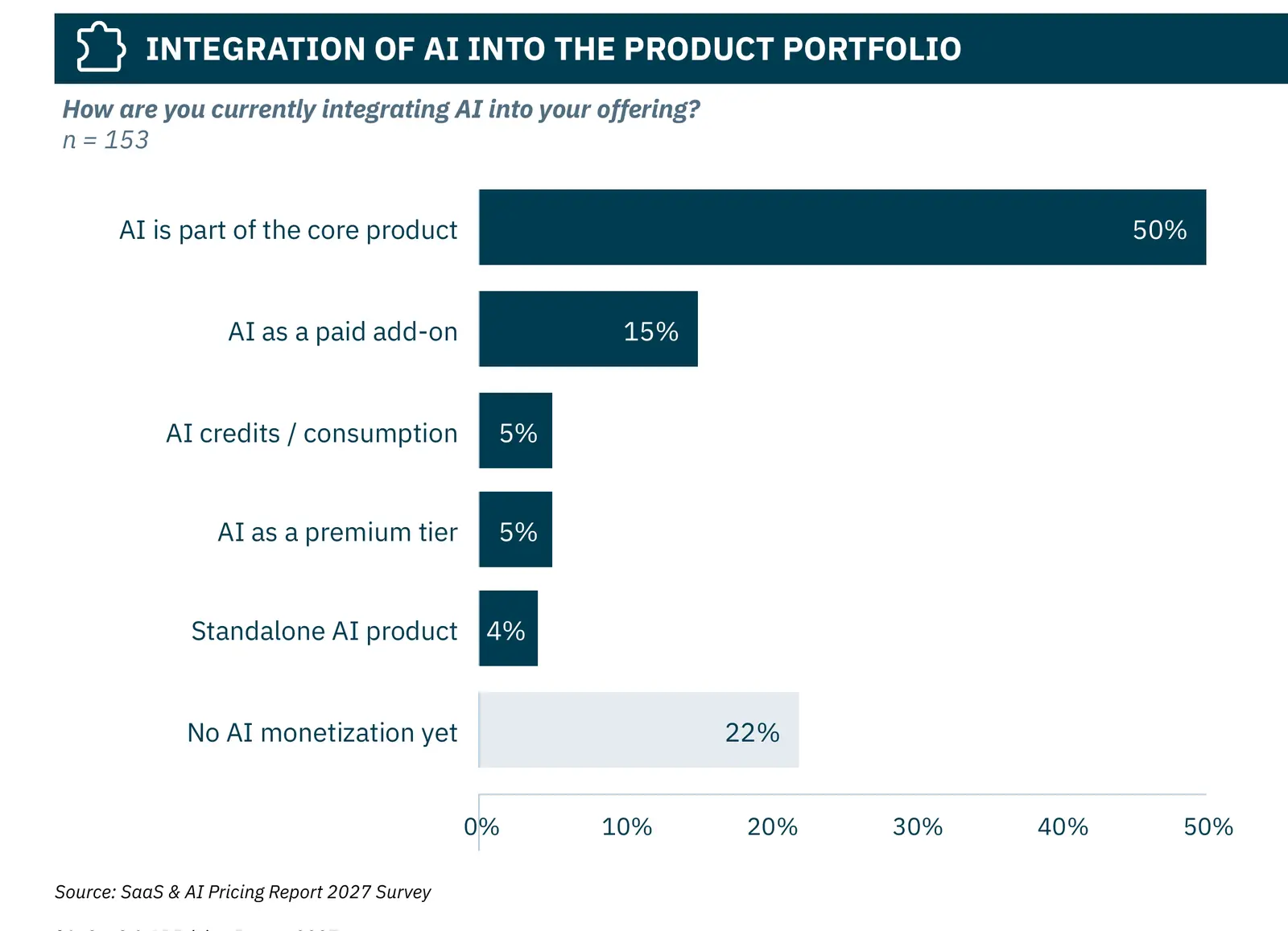
In AI, the add-on has been the exception so far. For our SaaS & AI Pricing Report 2027, we surveyed 153 software and AI vendors online. 50% of them put AI into the core product, 15% sell it as an add-on, 5% each through credits or a separate premium tier, and 4% as a separate product. 22% don't monetize AI at all yet. At the same time, launching new AI plans or add-ons ranks third among planned pricing measures for the next 12 months, and simplifying packaging ranks fourth. You can only do both if new add-ons appear where the table above suggests, and old ones that hardly anyone buys move into a plan or go away. I cover how to price AI features and agents separately.
What you can do on Monday
- Pull usage by feature. What share of customers uses which feature? Anything below about 20% is a candidate for an add-on; anything above 90% belongs in the base tier.
- Flag running costs. Features with noticeable costs per use need a cap, an allowance or a usage-based price.
- Count your existing add-ons. What barely sells? Move it into a plan or drop it.
- Check prices against the next tier. No add-on should make the upgrade unattractive.
- Separate enterprise features. Security, integrations and service for large customers often belong in the enterprise plan rather than in a long add-on list.
Packaging is the third step in our approach. It comes before the price level, because you first have to settle what a customer gets for the money.
Bottom line: The add-on is for the exception
What almost everyone needs goes in the plan, and what many value drives the upgrade to a larger one. An add-on is for the small group with high value and for features that cost you money per use. Price it on that group's value and so that it doesn't replace the step to the next tier.
You can see how your pricing page presents plans and add-ons today in about a minute with the free pricing audit on pricing-friends.de. It reads your pricing page live, checks pricing model, packaging and price points, and gives a score from 0 to 100 with findings. The check follows the approach hy Consulting Group developed in more than 600 pricing projects.
Sources
- SaaS & AI Pricing Report 2027 by hy, pp. 13, 21, 22, 23, 24, 26, 38
- SaaS & AI Pricing Report 2026 by hy, p. 27
- Microsoft: Announcing Copilot for Microsoft 365 general availability and Microsoft 365 Chat, September 21, 2023
- Pricing Friends, episode 99: Sonderfolge: SaaS-Pricing, AI und die Zukunft der Preismodelle, Dr. Sebastian Voigt with Julius Göllner
- Pricing Friends, episode 113: Spend Management-Software und Pricing mit Nikolai Skatchkov: Wie skaliert man profitabel in einem Markt, der noch kaum digitalisiert ist?
- Pricing Friends, episode 124: HRtech und Pricing mit Jenny Podewils: Warum KI bei Leapsome kein eigenes Preisschild bekommt
- Pricing Friends, episode 142: SaaS- und AI-Pricing mit Mariella Knospe und Felix Rahlmeyer: Wie bepreist man Software und AI im Jahr 2027?
Quotes are translated from German. The podcast episodes are in German.