
AI search · 7 min read
How to check and fix wrong prices in ChatGPT, Claude and Gemini

Key points
- Wrong software prices in ChatGPT, Claude or Gemini almost always come from third-party or outdated web sources. You can only correct them in those sources.
- A single AI answer about software prices tells you little, because answers vary. Vendors do better to query several AI systems on several days and record the cited source.
- When AI answers show wrong prices, a software vendor fixes its pricing page first: prices as text, with currency, billing period, and net or gross of VAT. Review profiles and comparison pages come next.
- AI systems like ChatGPT rely more on third-party pages than on a software vendor's own website. So announce price changes everywhere at the same time.
When ChatGPT, Claude, Gemini or Google's AI answers quote wrong prices for your software, the cause is almost always the sources. The systems build their answers from them, and that's the only place you can fix the error. Query the systems systematically and find out where the wrong price comes from. Then fix your own pricing page, and after that update review platforms, old articles and comparison pages. You'll only see whether it worked after a few weeks.
Where the wrong prices come from
For questions close to a purchase, the systems rarely answer from their training alone. They search for current sources, pull passages from them and build the answer on top. Malte Landwehr, CPO and CMO of Peec AI, explained to me on the podcast that the systems look for consensus. One source isn't enough. The information has to appear the same way in several documents.
That's a problem for your prices, because a lot of people write about you. Landwehr put it this way: “If my website says it starts at €19, then there are guaranteed to be three Reddit posts somewhere where someone says it costs €160, and some competitor has written a comparison table saying it costs €80 on average.” The system sees three numbers and has to pick one.
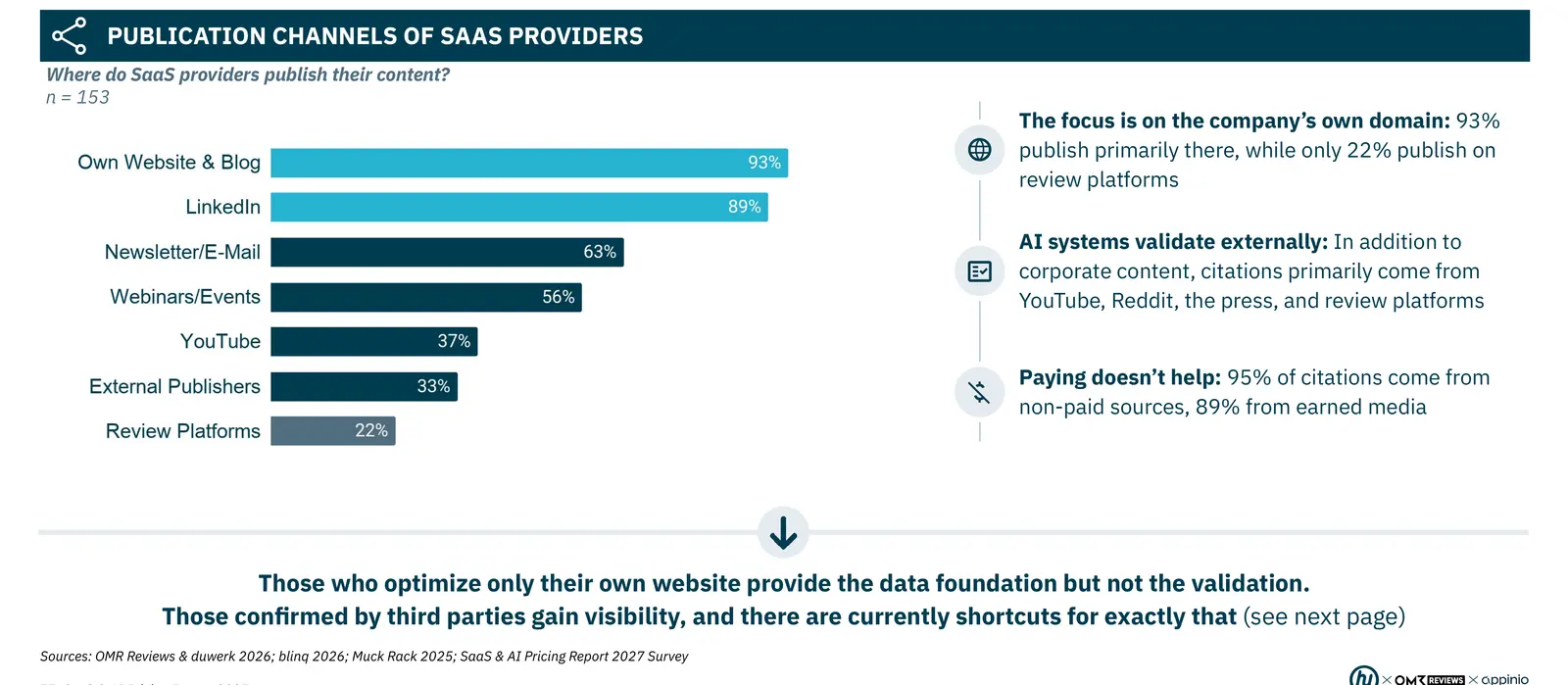
Data from our SaaS & AI Pricing Report 2027 shows how unevenly the weight is distributed. Of the 153 SaaS and AI companies we surveyed for it, 93% publish mainly on their own domain, and only 22% on review platforms. In the report, Marvin Müller of the German software review platform OMR Reviews cites an analysis by AirOps. It found that brands are cited 6.5 times more often through external sources than through their own domain. If you only maintain your own site, you supply the data but not the confirmation.
Step 1: Query the systems systematically
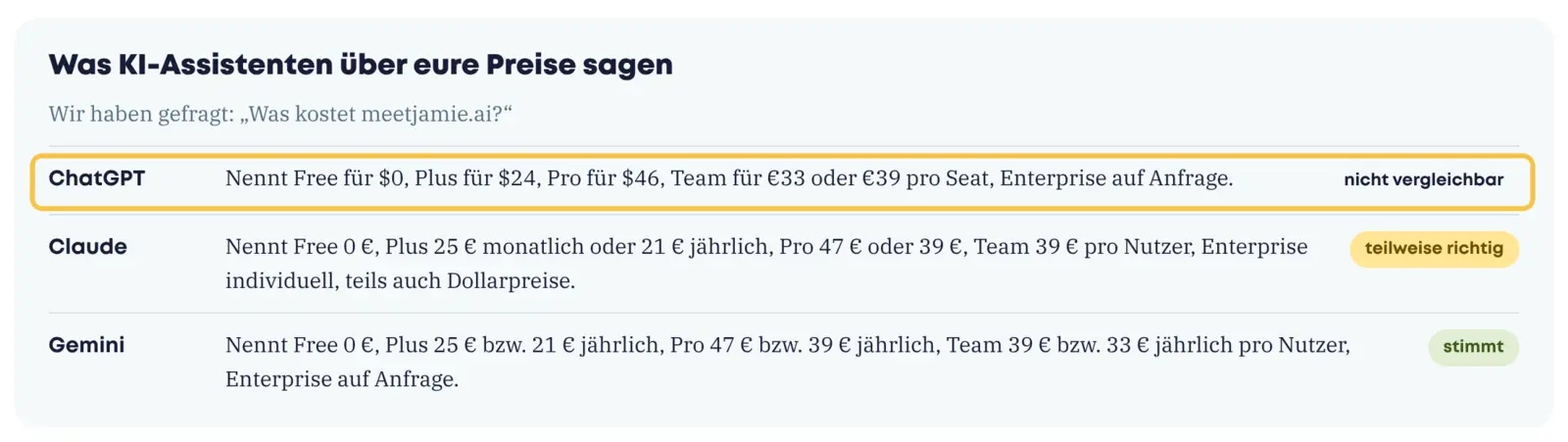
A single question to ChatGPT tells you little. Answers vary from one time to the next. That's why Landwehr advises: “We always recommend that customers don't look at just one chat at all, because LLMs have a certain randomness built in.” You only get reliable results when you ask the same questions several times and evaluate the answers together.
Here's how:
- Set the questions. At least these five: What does your product cost? Which plans are there? Is there a free version? What does the enterprise version cost? How expensive are you compared with your main competitor?
- Ask several systems. ChatGPT, Claude and Gemini, each with web search turned on, plus the AI answers in Google Search.
- Repeat. Ask each question on several days and evaluate the answers together.
- Log everything. For each answer: system, date, price quoted, plan name, billing period and the cited source.
- Cross-check with the URL. Ask once with your pricing page's URL in the prompt. If the system then finds the right price, your page is readable and the problem lies with other sources.
Error patterns and their likely source
| What the AI says | Likely source | What you do |
|---|---|---|
| A price you used to have | Old blog posts, help center, press releases, LinkedIn posts, comparison articles | Update or remove your own old content, contact authors of third-party articles |
| A price you never had | Averages from comparison tables or forums, no readable pricing page | Put prices as text on your own page, maintain review profiles |
| Monthly and annual price mixed up | Pricing page with a toggle where only one value is in the text | Write out both prices, with billing period |
| Net and gross of VAT mixed up | Missing information on the pricing page | “plus VAT” or “incl. VAT” right next to the price |
| Dollars instead of euros | English page or international review platform | Prices per market in local currency, link language versions |
| “Price on request” although prices exist | Prices only in images, PDFs or loaded via JavaScript | Prices in HTML text, check the page without JavaScript |
Landwehr showed how much the last pattern matters with an example from investor relations work: ChatGPT gave wrong information about an annual report because it wasn't allowed to open the PDF. Prices work the same way. Whatever the system can't read, it replaces with something else.
Step 2: Fix your own source
Your pricing page is the only source you fully control. Landwehr says the most important thing is to make your own website technically accessible and easy to read, and that often means not hiding content behind JavaScript. Specifically:
- Prices, plans and features appear as text on the page, not only in graphics.
- Every price shows currency, billing period and whether it's net or gross of VAT.
- A Q&A block below the table answers in full sentences what the check marks leave open. Landwehr recommends giving a language model your pricing page and asking what's unclear. That gives you the questions for the block.
- The AI systems' crawlers aren't blocked in robots.txt or in your CDN's default settings.
Google describes the same basics for its AI answers. According to its documentation for site owners, there are no additional requirements: A page has to be indexed and eligible to show with a snippet. Google adds that robots.txt and the CDN should allow crawling, important content should be available as text, and structured data should match the visible text. According to Google, you don't need special AI files or special markup. For search in ChatGPT, OpenAI uses the OAI-SearchBot crawler. According to OpenAI, pages that block it in robots.txt don't appear in search answers, at most as a navigation link.
All of this assumes your page shows prices at all. Whatever else makes a pricing page easy for buyers to read helps the AI systems too.
Step 3: Update third-party and old sources
Next come the sources you can only influence. 95% of citations in AI answers come from unpaid sources, 89% from earned media. So advertising won't solve this.
- Review platforms. Update your profiles with the same prices and plan names as on your own site.
- Your own old content. Blog posts, help center pages and old LinkedIn posts with former prices. Landwehr advises deleting such posts when in doubt.
- Third-party articles. Write to the authors and ask for a correction. After changing its own prices, Peec AI, Landwehr's company, set up an alert for articles with the old price and emails the authors. Many update the text, some don't.
- Press release. It can make sense for a larger price change. Landwehr doesn't expect a journalist to pick it up. But it ends up on many sites and gives the systems more documents to form a consensus from.
Step 4: Measure again, over months
When a source changes, the answer doesn't change the next day. The patterns of cited sources shift over months. That's why our report recommends ongoing measurement with one person responsible. So set up the query from step 1 as a recurring task, for example monthly and after every price change.
Announce price changes instead of hiding them
This leads to something that goes against the grain for many software vendors. Until now, most have tried to keep a price increase under the radar as much as possible. In my conversation with Landwehr, I described this as a shift in thinking: With buying decisions made through AI assistants, you have to announce a price change firmly, and the same way everywhere. If you raise prices quietly, the old prices stay in comparison articles and forums. The systems then find more old documents than new ones. So announce the new prices on all channels at the same time. Existing customers need their own announcement with advance notice. For larger changes that affect the pricing page, sales and existing customers at once, a specialized pricing consultancy such as hy can help coordinate the steps.
Bottom line: Fix the sources, not the model
Wrong prices in AI answers originate where people write about you. To correct them, you need the source of each error and a clear pricing page of your own. Expect weeks to months before the answers change.
You can get a first read in about a minute with the free pricing audit on pricing-friends.de. It reads your pricing page live, asks ChatGPT, Claude and Gemini the price question about your company and compares the answers with your page. The check follows the approach hy Consulting Group developed in more than 600 pricing projects.
Sources
- SaaS & AI Pricing Report 2027 by hy, pp. 71, 77, 79
- Pricing Friends, episode 145: LLM-Sichtbarkeit und Pricing mit Malte Landwehr: Warum gewinnt transparentes Pricing in der KI-Suche?
- Google Search Central: AI features and your website, accessed October 17, 2026
- OpenAI: Overview of OpenAI Crawlers, accessed October 17, 2026
Quotes are translated from German. The podcast episodes are in German.